
provider-ibm-secrets-manager.md 7.1 KB
IBM Cloud Secret Manager
External Secrets Operator integrates with IBM Secret Manager for secret management.
Authentication
We support API key and trusted profile container authentication for this provider.
API key secret
To generate your key (for test purposes we are going to generate from your user), first got to your (Access IAM) page:

On the left, click "IBM Cloud API Keys":

Press "Create an IBM Cloud API Key":

Pick a name and description for your key:

You have created a key. Press the eyeball to show the key. Copy or save it because keys can't be displayed or downloaded twice.

Create a secret containing your apiKey:
kubectl create secret generic ibm-secret --from-literal=apiKey='API_KEY_VALUE'
Trusted Profile Container Auth
To create the trusted profile, first got to your (Access IAM) page:
On the left, click "Access groups":

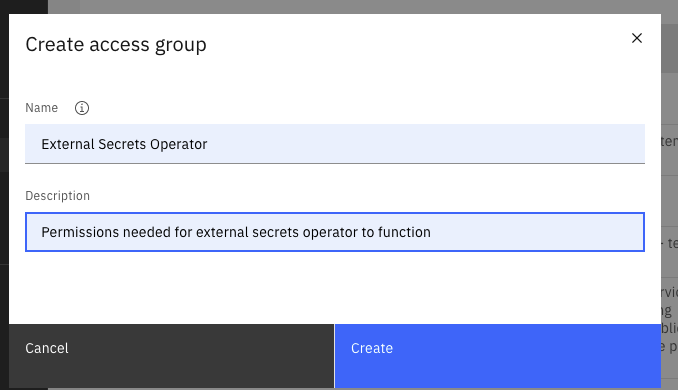
Pick a name and description for your group:
Click on "Access Policies":

Click on "Assign Access", select "IAM services", and pick "Secrets Manager" from the pick-list:

Scope to "All resources" or "Resources based on selected attributes", select "SecretsReader":

Click "Add" and "Assign" to save the access group.
Next, on the left, click "Trusted profiles":

Press "Create":

Pick a name and description for your profile:

Scope the profile's access.
The compute service type will be "Red Hat OpenShift on IBM Cloud". Additional restriction can be configured based on cloud or cluster metadata, or if "Specific resources" is selected, restriction to a specific cluster.

Click "Add" next to the previously created access group and then "Create", to associate the necessary service permissions.

To use the container-based authentication, it is necessary to map the API server serviceAccountToken auth token to the "external-secrets" and "external-secrets-webhook" deployment descriptors. Example below:
{% include 'ibm-container-auth-volume.yaml' %}
Update secret store
Be sure the ibm provider is listed in the Kind=SecretStore
{% include 'ibm-secret-store.yaml' %}
NOTE: In case of a ClusterSecretStore, Be sure to provide namespace in secretApiKeySecretRef with the namespace where the secret resides.
NOTE: Only secretApiKeySecretRef or containerAuth should be specified, depending on authentication me
thod being used.
To find your serviceURL, under your Secrets Manager resource, go to "Endpoints" on the left.
Note: Use the url without the /api suffix that is presented in the UI.
See here for a list of publicly available endpoints.

Secret Types
We support the following secret types of IBM Secrets Manager:
arbitraryusername_passwordiam_credentialsimported_certpublic_certprivate_certkv
To define the type of secret you would like to sync you need to prefix the secret id with the desired type. If the secret type is not specified it is defaulted to arbitrary:
{% include 'ibm-es-types.yaml' %}
The behavior for the different secret types is as following:
arbitrary
remoteRefretrieves a string from secrets manager and sets it for specifiedsecretKeydataFromretrieves a string from secrets manager and tries to parse it as JSON object setting the key:values pairs in resulting Kubernetes secret if successful
username_password
remoteRefrequires apropertyto be set for eitherusernameorpasswordto retrieve respective fields from the secrets manager secret and set in specifiedsecretKeydataFromretrieves bothusernameandpasswordfields from the secrets manager secret and sets appropriate key:value pairs in the resulting Kubernetes secret
iam_credentials
remoteRefretrieves an apikey from secrets manager and sets it for specifiedsecretKeydataFromretrieves an apikey from secrets manager and sets it for theapikeyKubernetes secret key
imported_cert, public_cert and private_cert
remoteRefrequires apropertyto be set for eithercertificate,private_keyorintermediateto retrieve respective fields from the secrets manager secret and set in specifiedsecretKeydataFromretrieves allcertificate,private_keyandintermediatefields from the secrets manager secret and sets appropriate key:value pairs in the resulting Kubernetes secret
kv
- An optional
propertyfield can be set toremoteRefto select requested key from the KV secret. If not set, the entire secret will be returned dataFromretrieves a string from secrets manager and tries to parse it as JSON object setting the key:values pairs in resulting Kubernetes secret if successful
{
  "key1": "val1",
  "key2": "val2",
  "key3": {
    "keyA": "valA",
    "keyB": "valB"
  },
  "special.key": "special-content"
}
data:
- secretKey: key3_keyB
  remoteRef:
    key: 'kv/aaaaa-bbbb-cccc-dddd-eeeeee'
    property: 'key3.keyB'
- secretKey: special_key
  remoteRef:
    key: 'kv/aaaaa-bbbb-cccc-dddd-eeeeee'
    property: 'special.key'
- secretKey: key_all
  remoteRef:
    key: 'kv/aaaaa-bbbb-cccc-dddd-eeeeee'

dataFrom:
  - key: 'kv/aaaaa-bbbb-cccc-dddd-eeeeee'
    property: 'key3'
results in
data:
  # secrets from data
  key3_keyB: ... #valB
  special_key: ... #special-content
  key_all: ... #{"key1":"val1","key2":"val2", ..."special.key":"special-content"}

  # secrets from dataFrom
  keyA: ... #valA
  keyB: ... #valB
Creating external secret
To create a kubernetes secret from the IBM Secrets Manager, a Kind=ExternalSecret is needed.
{% include 'ibm-external-secret.yaml' %}
Currently we can only get the secret by its id and not its name, so something like 565287ce-578f-8d96-a746-9409d531fe2a.
Getting the Kubernetes secret
The operator will fetch the IBM Secret Manager secret and inject it as a Kind=Secret
kubectl get secret secret-to-be-created -n <namespace> | -o jsonpath='{.data.test}' | base64 -d