
 Ryan
6fa11bf219
Separate RGBLight/RGB Matrix keycode handling (#23679)
Ryan
6fa11bf219
Separate RGBLight/RGB Matrix keycode handling (#23679)
|
hai 1 ano | |
|---|---|---|
| .. | ||
| base | 3c868b9316 `ergodox_ez/base`: Add missing `features` object (#23935) | %!s(int64=2) %!d(string=hai) anos |
| glow | 6fa11bf219 Separate RGBLight/RGB Matrix keycode handling (#23679) | hai 1 ano |
| keymaps | 6fa11bf219 Separate RGBLight/RGB Matrix keycode handling (#23679) | hai 1 ano |
| shine | 208ebf54a9 WS2812 API rework (#24364) | hai 1 ano |
| util | e659c3dae9 Remove some useless code from keymaps (#23787) | %!s(int64=2) %!d(string=hai) anos |
| config.h | bf42707eed Migrate `LOCKING_*_ENABLE` to Data-Driven: E (#23751) | %!s(int64=2) %!d(string=hai) anos |
| ergodox_ez.c | 6fa11bf219 Separate RGBLight/RGB Matrix keycode handling (#23679) | hai 1 ano |
| ergodox_ez.h | 61c7c1f74c Convert some AVR GPIO operations to macros (#23424) | %!s(int64=2) %!d(string=hai) anos |
| info.json | bf42707eed Migrate `LOCKING_*_ENABLE` to Data-Driven: E (#23751) | %!s(int64=2) %!d(string=hai) anos |
| matrix.c | d09a06a1b3 Update GPIO API usage in keyboard code (#23361) | %!s(int64=2) %!d(string=hai) anos |
| post_config.h | 208ebf54a9 WS2812 API rework (#24364) | hai 1 ano |
| readme.md | 2a65709db6 [Keyboard] Update to ZSA Boards (#10119) | %!s(int64=5) %!d(string=hai) anos |
| rules.mk | 9de5238103 Data-Driven Keyboard Conversions: E (#23512) | %!s(int64=2) %!d(string=hai) anos |
readme.md
ErgoDox EZ
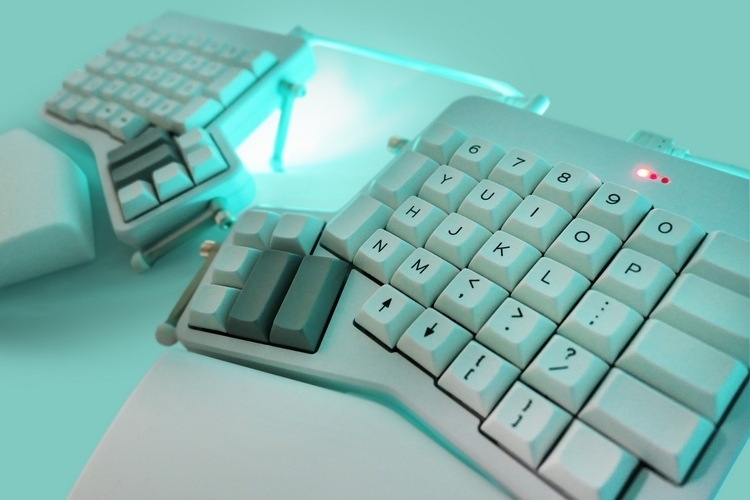
The ErgoDox EZ is a mass produced version of the original ErgoDox keyboard, with optional support for RGB Light (Shine) or RGB Matrix (Glow).
- Keyboard Maintainer: ZSA Technology Labs Inc, Firmware maintained by drashna
- Hardware Supported: Original ErgoDox, ErgoDox EZ
- Hardware Availability: ErgoDox EZ, ErgoDox.io
Make example for this keyboard (after setting up your build environment):
make ergodox_ez:default:flash
For the ErgoDox EZ Shine, and Glow, use one of the following:
make ergodox_ez/shine:default:flash
make ergodox_ez/glow:default:flash
See the build environment setup and the make instructions for more information. Brand new to QMK? Start with our Complete Newbs Guide.
Oryx Configuation
If you have ORYX_CONFIGURATOR defined in your keymap's config.h, this enables a number of the built in options from the Oryx Configurator.
Indicator LEDs
You can use the LED_LEVEL keycode to cycle through the brightness levels for the LEDs on the top right of the keyboard. These settings are saved in eeprom (persistant memory).
Alternatively, you can set the brightness by calling the following functions:
void ergodox_led_all_set(uint8_t level);
void ergodox_right_led_1_set(uint8_t level);
void ergodox_right_led_2_set(uint8_t level);
void ergodox_right_led_3_set(uint8_t level);
These settings are not persistent, so you'd need to reset it every time the board starts.
These are on a 0-255 scale
RGB Matrix Features
If you're using the Smart LED (layer indication) feature from the Oryx Configurator, you want to make sure that you enable these options by adding #define ORYX_CONFIGURATOR to your keymap's config.h.
This changes the RGB_TOG keycode so that it will toggle the lights on and off, in a way that will allow the Smart LEDs to continue to work, even with the rest of the LEDs turned off.
Additionally, a new keycode has been added to toggle the Smart LEDs. Use TOGGLE_LAYER_COLOR, if you aren't already.