
 Konstantin Đorđević
4d9b11af14
Fix Command feature: use get_mods() instead of keyboard_report->mods (#4955)
Konstantin Đorđević
4d9b11af14
Fix Command feature: use get_mods() instead of keyboard_report->mods (#4955)
|
%!s(int64=7) %!d(string=hai) anos | |
|---|---|---|
| .. | ||
| keymaps | %!s(int64=7) %!d(string=hai) anos | |
| config.h | %!s(int64=7) %!d(string=hai) anos | |
| config_led.h | %!s(int64=7) %!d(string=hai) anos | |
| ctrl.h | %!s(int64=7) %!d(string=hai) anos | |
| info.json | %!s(int64=7) %!d(string=hai) anos | |
| led_programs.c | %!s(int64=7) %!d(string=hai) anos | |
| matrix.c | %!s(int64=7) %!d(string=hai) anos | |
| matrix.h | %!s(int64=7) %!d(string=hai) anos | |
| readme.md | %!s(int64=7) %!d(string=hai) anos | |
| rules.mk | %!s(int64=7) %!d(string=hai) anos | |
readme.md
CTRL
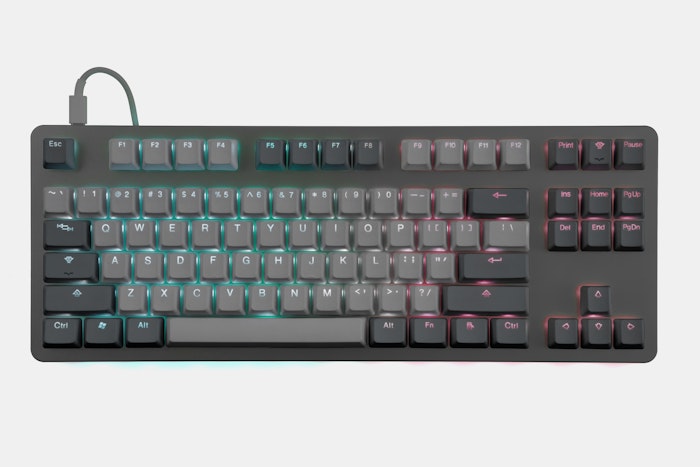
The Massdrop CTRL is a TKL mechanical keyboard featuring dual USB-C connectors, an integrated Hi-Speed USB 2.0 hub, and fully customizable RGB backlighting and underlighting.
Keyboard Maintainer: Massdrop
Hardware Supported: Massdrop, Inc. CTRL PCBs utilizing Microchip's ATSAMD51J18A MCU and USB2422 2-Port USB 2.0 Hi-Speed Hub Controller, and ISSI's IS31FL3733 LED Drivers.
Hardware Availability: Massdrop CTRL Mechanical Keyboard
Make example for this keyboard (after setting up your build environment):
make massdrop/ctrl:default
For information on flashing this keyboard, visit the following links:
Massdrop Loader Releases
Massdrop Loader Repository and Instructions
See the build environment setup and the make instructions for more information. Brand new to QMK? Start with our Complete Newbs Guide.